All of you may be familiar with the printing function of Google Chrome browser, which lets you save any webpage as pdf file. I have written a tutorial where you can save any webpage as pdf in chrome browser, http://indiafunworld.blogspot.com /2012/09/how-to-create-pdf-files-using-google-chrome.html" target="_blank">see here. I also written about converting a word document into pdf (docx to pdf) by using chrome browser, http://indiafunworld.blogspot.com /2014/03/convert-word-doc-to-pdf.html" target="_blank">see here. Both these tutorials are for the desktop/MAC version of Google Chrome. Now in this tutorial I am going to tell you how you can save any webpage, image or text that is opened in chrome browser as a pdf file on your android phone.
This pdf printing feature is build in the android version of Chrome browser, but it is not supported on all android phones, it is currently supported in android 4.4 KitKat and above. This is an extremely useful feature because anytime we may feel the need to save any webpage in pdf format, because it can not be easily edited there by assuring unexpected changes in file as we can do in a word or text file. A pdf serves as a hard copy print which can’t be edited without special tools. You can safely share these files via mail or view on your android or desktop PC.
This printing feature will only work on phones running android KitKat and above. Other users can use Google Cloud Print for the same task.
You can send this file via mail to any of your friends when needed, you can also view it on PC. If you liked the article please share it.
This pdf printing feature is build in the android version of Chrome browser, but it is not supported on all android phones, it is currently supported in android 4.4 KitKat and above. This is an extremely useful feature because anytime we may feel the need to save any webpage in pdf format, because it can not be easily edited there by assuring unexpected changes in file as we can do in a word or text file. A pdf serves as a hard copy print which can’t be edited without special tools. You can safely share these files via mail or view on your android or desktop PC.
This printing feature will only work on phones running android KitKat and above. Other users can use Google Cloud Print for the same task.
How To Save Webpages As PDF In Google Chrome On Android
- Open any webpage in chrome browser and tap the menu options on top right corner. From here select ‘Print’.
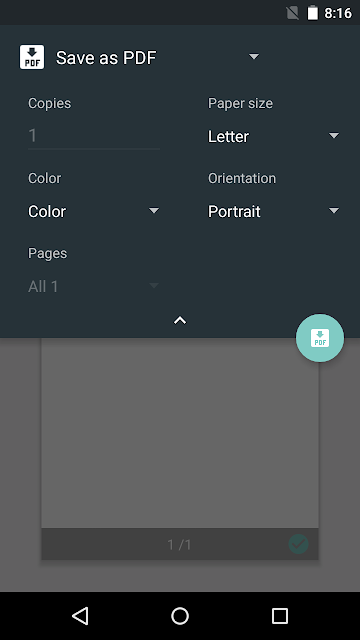
- A print dialogue will open. Here you can select ‘Paper size’ which include options like ‘Letter’, ‘Index Card’, Ledger, Tabloid etc.

- Tap ‘Orientation’ to select between ‘Portrait’ or ‘Landscape’. Sometimes it is better to choose ‘Landscape’ because the text contents fits well in this print layout.
- Tap ‘Color’ and either select ‘Black & White’ or leave as it is. Choosing ‘Black & White’ will remove colours from the pdf files.
- Tap ‘Pages’ to select which pages to print.
- Finally tap the green button having ‘PDF’ written on it.
- Now tap ‘Downloads’ and enter the name of your file. Finally tap ‘Save’.
- Go to this location ‘Internal sdcard>Downloads’. Tap on the file to open.
You can send this file via mail to any of your friends when needed, you can also view it on PC. If you liked the article please share it.


0 komentar:
Posting Komentar